Wattson Madison Streamer streaming DAC Boxout
Mirroring the hardware's simplicity and ease of use are its two control apps: Wattson Music, for iOS devices, and Wattson Remote, for Android [centre and right screenshots]. Both share the same uncluttered design, neat fonts and colour scheme, although the iOS iteration is more advanced, allowing for in-app playback from Tidal, Qobuz, Internet radio and UPnP network shares [near left screenshot]. Android users currently need to play local files via third-party applications (BubbleUPnP, mconnect, etc) and make use of the Madison Streamer's compatibility with Tidal Connect and Qobuz Connect or, alternatively, stream to it via Roon, AirPlay or Audirvana.
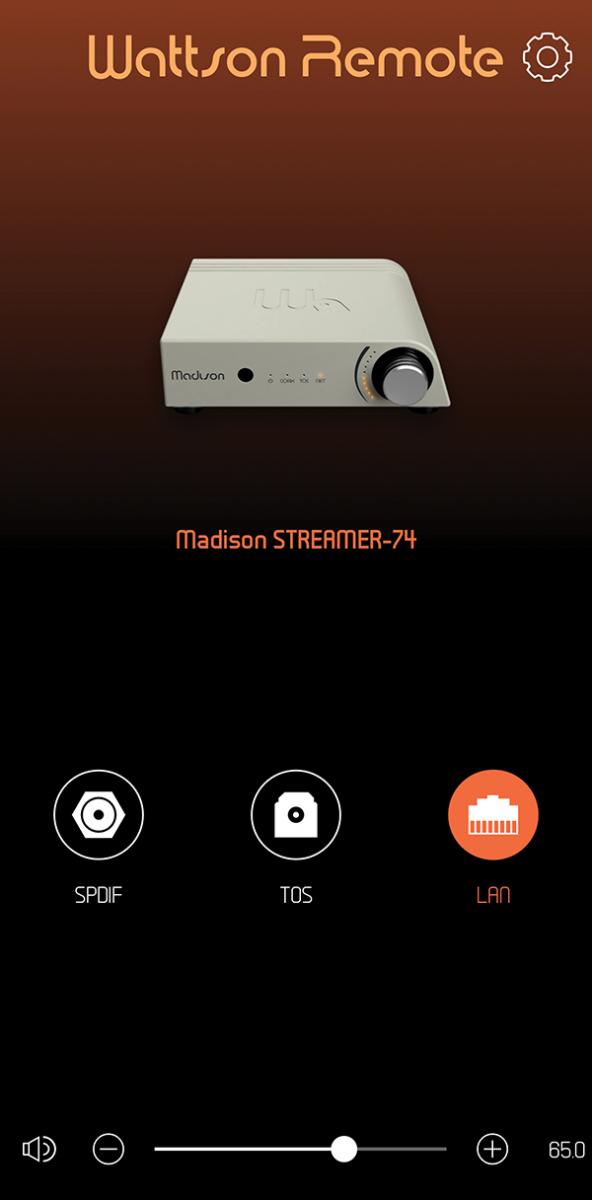
Otherwise, the settings menus on the iOS and Android apps are identical. Here you can rename the device inputs from their 'SPDIF', 'TOS' and 'LAN' defaults, choose an alternative name for the hardware itself, and adjust the brightness of the front-panel LEDs. Volume settings choose between fixed or variable output, plus a maximum level for when using the app's own volume slider. Lastly, a Tone Control section offers well-judged low-frequency EQ presets for Free Field, Near-Wall and Corner speaker placement.
 | |||||||||||

|
|
| |||||||||









 SPONSORED VIDEO







| Equipment Reviews | |
Music Reviews Awards | |
Latest News Features | |
Resources Newsletters | |
Subscriptions |
WHERE TECHNOLOGY BECOMES ENTERTAINMENT
 © 2026 Hi-Fi News
AVTech Media Ltd
All rights reserved